


Automate Processes and Workflows with AI—No Coding Required
Cflow combines no-code workflow automation with built-in AI to automate approvals, process documents, apply business rules, and streamline processes across departments. It centralizes and simplifies operations, reduces manual tasks, and improves visibility across every process.


What is Cflow?
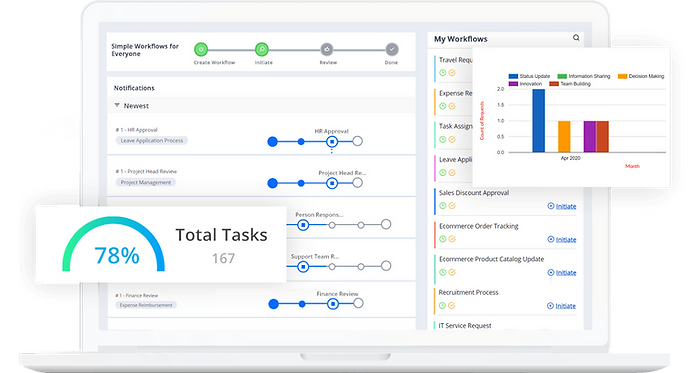
Cflow is a workflow automation and BPM platform that lets organizations centralize business processes—such as internal requests, approvals, purchasing, expenses, HR, IT, and more—within a web and mobile environment.
Instead of managing each workflow through email or isolated forms, Cflow:
-
Brings all requests and documents into one system.
-
Defines clear approval routes, with owners and timelines.
-
Provides visibility and metrics to improve productivity.
Key benefits
-
Fewer reworks and manual errors.
-
Faster, trackable approvals.
-
Lower risk of information loss.
-
Better compliance with internal policies and SLAs.


Forms & Data Capture
Cflow includes an advanced form builder to capture information from employees, customers, and vendors in one place.
With Cflow you can:
-
Customize forms with different layouts and themes based on the type of process (Human Resources, Marketing, Purchasing, Finance, etc.).
-
Design forms for:
-
Employee requests
-
Marketing and event forms
-
Invoices and purchase orders
-
Vacation requests
-
Surveys and participation registrations
-

Request a Meeting

Routing, Rules & Notifications
Cflow offers a robust set of capabilities to control how tasks move within the organization:
-
Routing & Notifications: Flexible options to route tasks to the right person and notify them at the right time.
-
Link Multiple Processes: Enables linking processes across teams (for example: purchase request → purchase order → payment), creating end-to-end solutions.
-
SLAs and Escalations: Defines response times and escalation rules to ensure tasks don’t get stuck.
-
Access from any browser and mobile app: Users can create requests, review information, approve tasks, or check a process status directly from their computer—without installing additional software. Mobile app available for iOS and Android.


Email & Notifications
Cflow includes an advanced notification system:
-
Immediate email notifications.
-
Fully customizable content, with dynamic fields (workflow data), text styling, and colors.
-
Ability to combine email and SMS for greater reach.
-
Attach documents dynamically (for example, a PDF generated by the workflow).
-
Approve or reject by replying to the email—no need to log in to the portal.

Vacations & Delegation
Work doesn’t stop. When someone goes on vacation or is out of the office, Cflow prevents processes from getting stuck:
-
An integrated system that automatically redirects tasks to the designated person while the user is away.
-
Managers can manually delegate tasks to other teammates based on the type of work or stage of the process.
-
Flexibility to create different delegation rules based on dates, processes, or business units.
Reports & Analytics
Visibility to make better decisions.
Cflow includes BPM reporting so you can monitor the performance of your processes:
-
Information for each workflow available at a glance to support informed decision-making.
-
Metrics on cycle times, productivity, and task completion.
-
Dashboards and reports that help identify bottlenecks, high-workload areas, and improvement opportunities.
Security & Compliance
-
Secure Data: Cflow protects sensitive information through encryption and security best practices.
-
Supports scenarios that require full traceability and auditing of who did what, and when.

Popular Workflow Actions

Approve
Manage approvals quickly and effortlessly.

e-Sign
Control and automate document signing.

Forms
Capture data with CFlow’s internal or public forms.

Vacations & Delegations
CFlow keeps everyone notified of your absences and ensures that work continues seamlessly.

Automatic emails keep your workflow under control

Request Information
Customized automation made simple.
Highlighted Features:
-
Workflow automation without the need for coding.
-
Business rules engine to tailor processes to your needs.
-
Dynamic and public forms to easily capture information.
-
Real-time email notifications about workflow actions.
-
Vacation and delegation processes to ensure work continuity.
-
Intuitive and simplified interface, easy for any user.
-
Real-time reports and dashboards for better control and analysis.
-
Integrations with multiple applications to centralize operations.
-
Mobile approvals from any device, anywhere.